Built by a sailor with 30,000 miles under the keel.

It started in the Cyclades — anchored in a southerly gale, trying to remember if the port engine impeller was last changed in Paros or Leros. After 8 years at sea, I built what I needed.

30,000+ nautical miles tested · 3 ocean crossings · 35+ countries
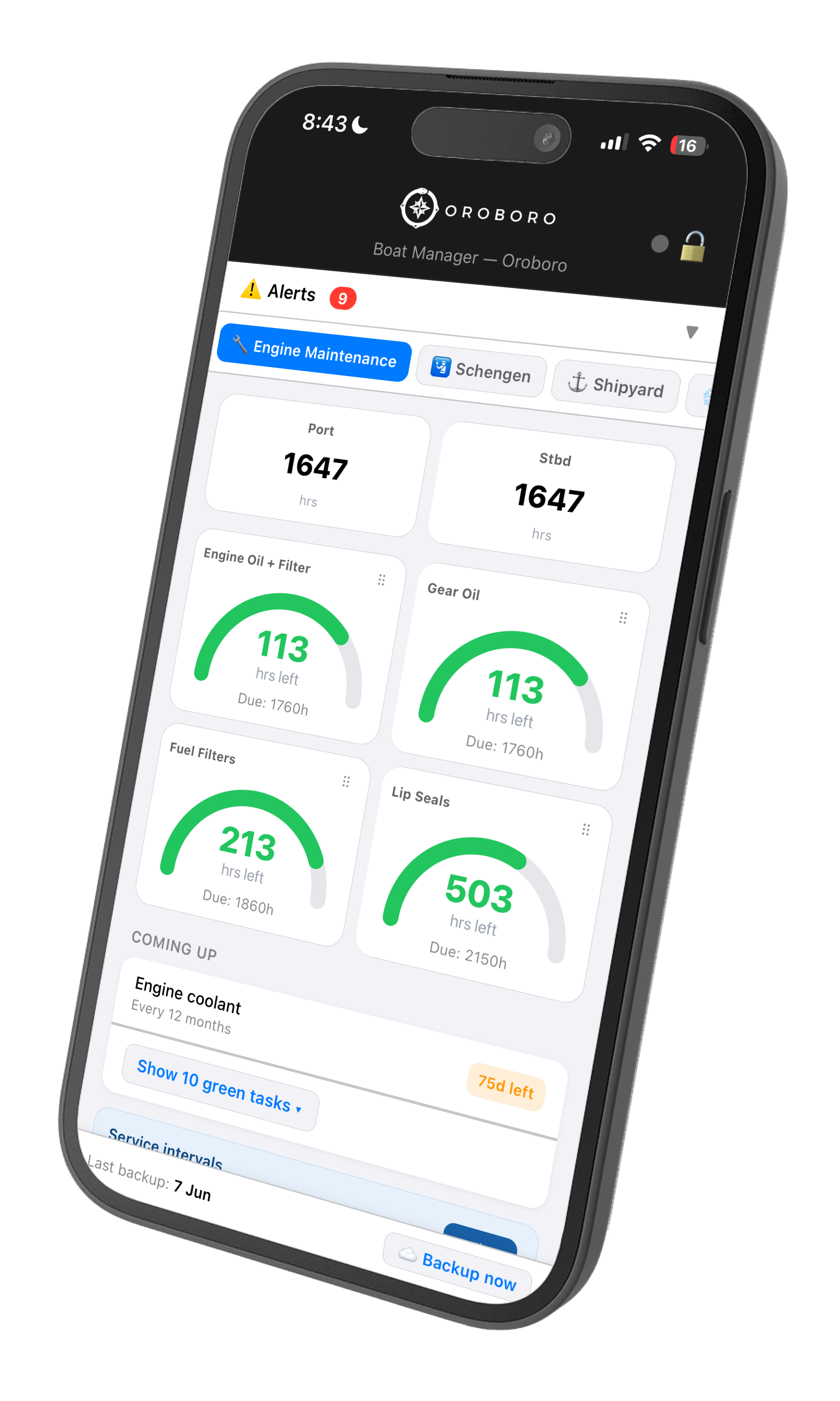
Engine Maintenance tab showing port and starboard engine hours with service interval gauges

Every sailor knows this feeling.

Your Transit Log expires in 47 days. Do you know that?

The paperwork for non-EU boats in Greece alone can sink your season.

The Schengen 180-day window has caught out sailors who thought they were fine.

The rolling window is brutal. Most apps don't even know it exists.

Your maintenance log lives in three notebooks, a WhatsApp thread, and someone's memory.

Good luck finding the last impeller replacement date.

Every boat manager app you've tried was built by someone who has never sailed.

Generic tools for weekend boaters. Nothing built for real bluewater cruisers.

Point your phone. It's imported.

Take a photo of your insurance certificate. Your maintenance log. A Victron device label. A box of pasta. AI reads it and imports it into the right place — automatically.

No copy-pasting. No broken CSV imports. No reformatting spreadsheets at midnight in an anchorage with no WiFi.

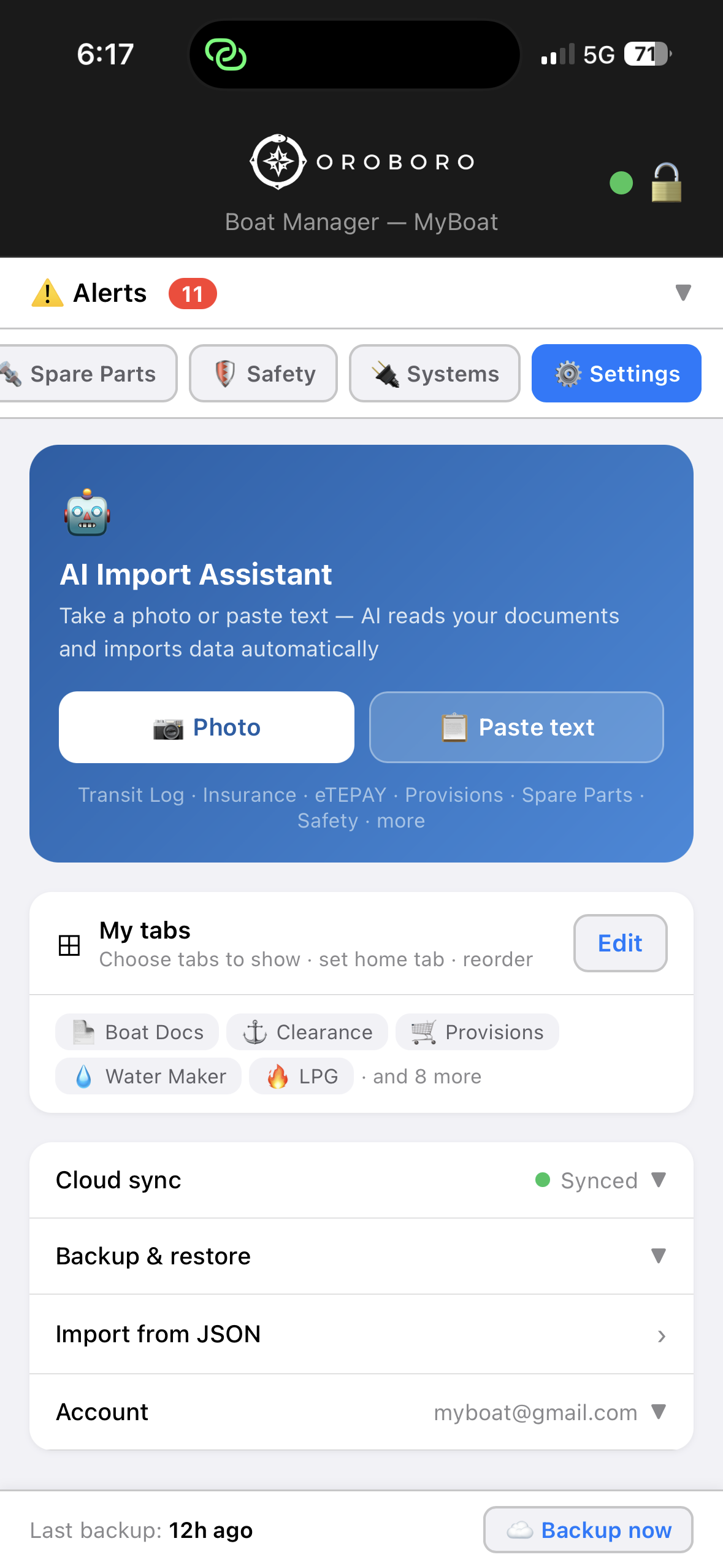
AI Import Assistant — take a photo or paste text to import data automatically

The whole boat, one app.

Every tab covers something real — built from years of liveaboard sailing, not a product manager's wishlist.

Clearance

Your legal status, at a glance.

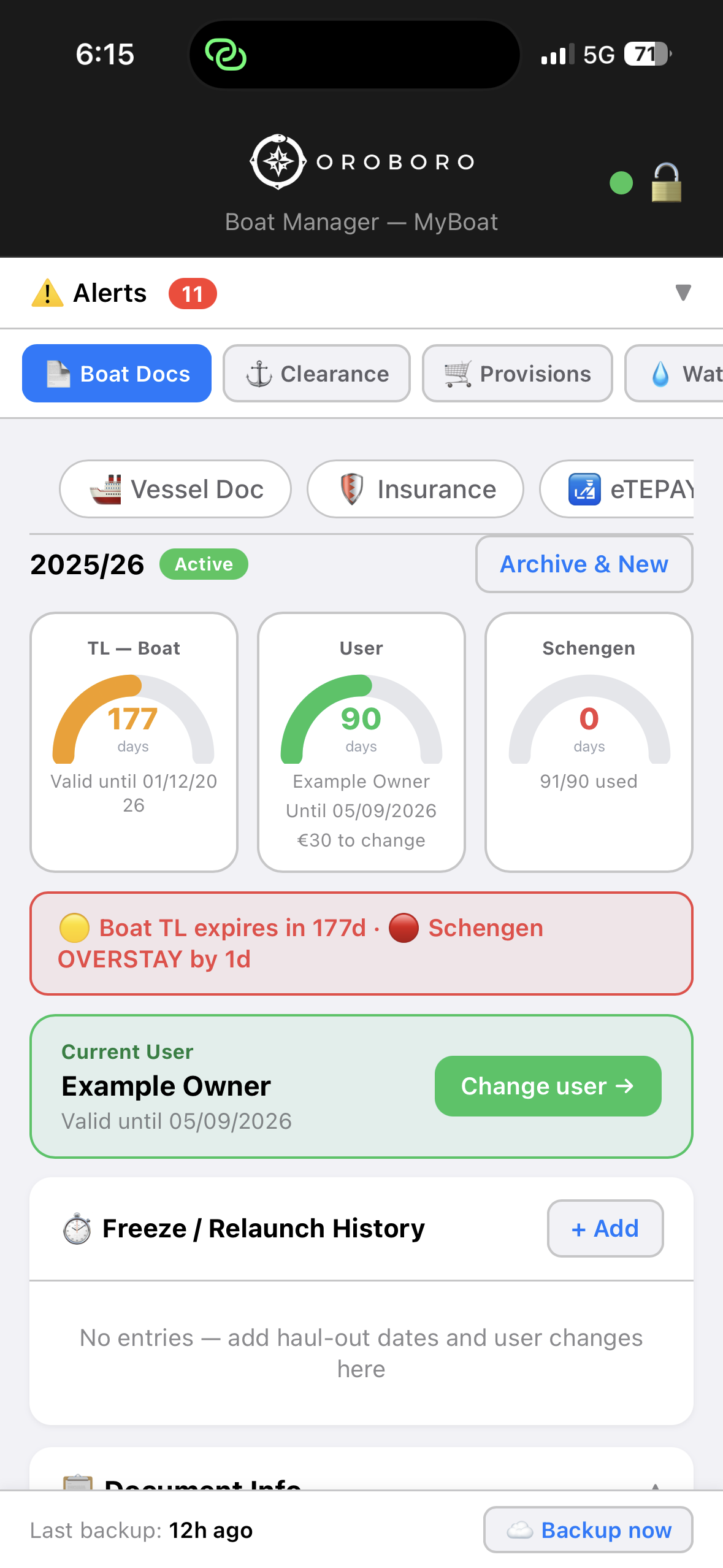
Non-EU boats in Greece juggle Transit Log validity, eTEPAY payments, and the Schengen 90/180-day rolling window simultaneously. Miss one date and it costs thousands. The Clearance tab shows every countdown on one screen — green, amber, or red. No spreadsheet hunting the night before you check in.

Clearance tab showing Transit Log and Schengen countdown gauges
Engine Maintenance

Never miss a service interval again.

Track port and starboard engine hours separately. Every service item — engine oil, gear oil, fuel filters, lip seals — gets its own gauge showing exactly how many hours remain before the next change. Time-based tasks like coolant flushes show a day countdown alongside the hour-based ones. You'll never pull into a boatyard having to say "I think it was due around…"

Engine Maintenance tab showing port and starboard hours with service interval gauges
Provisions

One list. Everyone on board sees it.

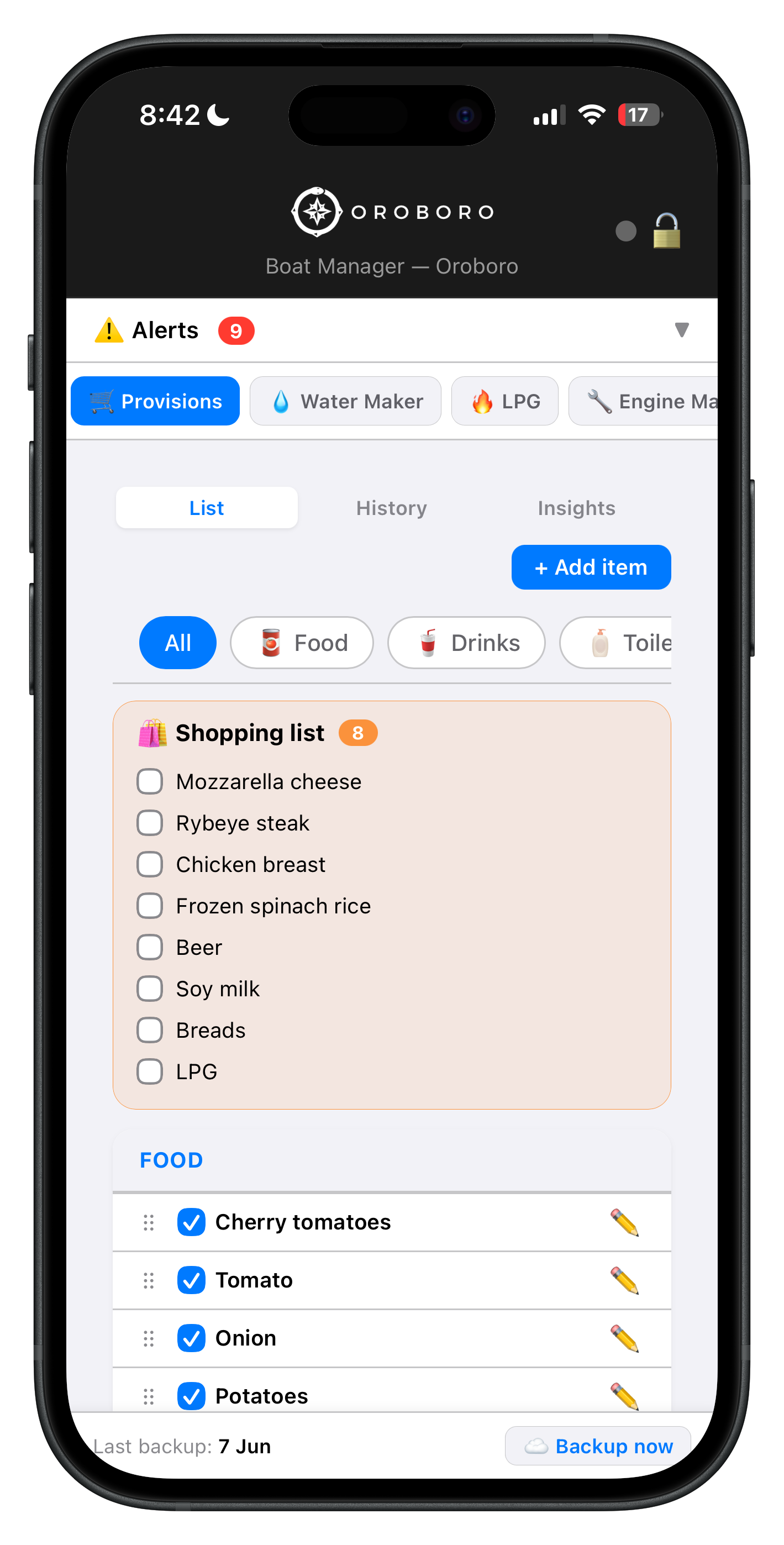
Build your provisioning inventory by category — food, drinks, toiletries, and more. A shopping list shows exactly what needs restocking. Check off items as you shop; your crew sees updates in real time without a phone call. History and insights tabs show what you've stocked before, so reprovisioning for a long passage takes minutes, not an afternoon.

Provisions tab showing shopping list and food inventory by category
Spare Parts

Know exactly what's on board. Before you need it.

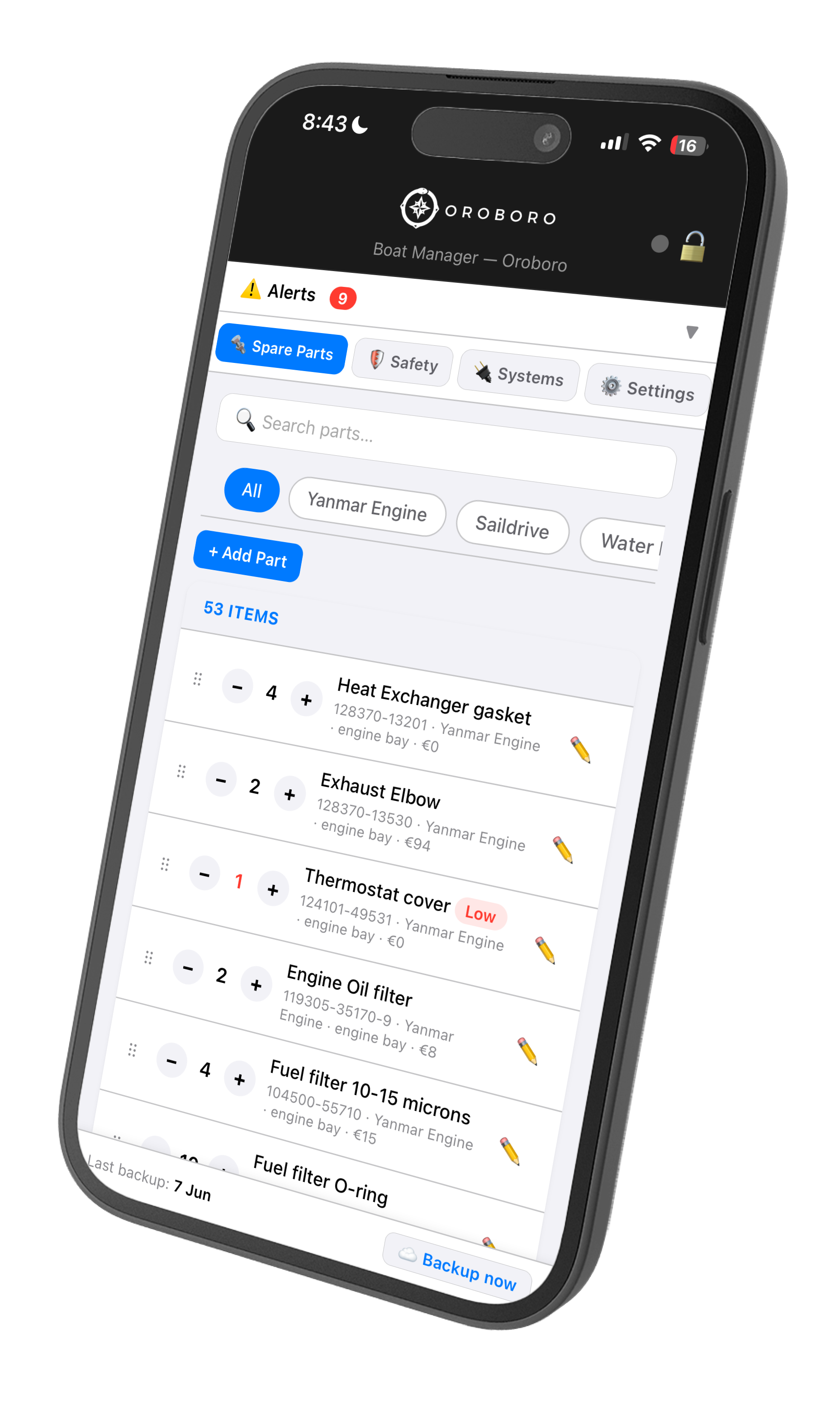
Catalog every spare by manufacturer part number, quantity, storage location, and cost paid. Filter by system — Yanmar engine, saildrive, watermaker, electrical. Adjust stock counts with a tap. When a part drops low it flags red, so you order before the next crossing — not after you've already left the last chandlery three weeks behind you.

Spare Parts tab showing inventory of 53 parts with part numbers, quantities and low-stock alerts
Systems

Your entire boat, documented from keel to masthead.

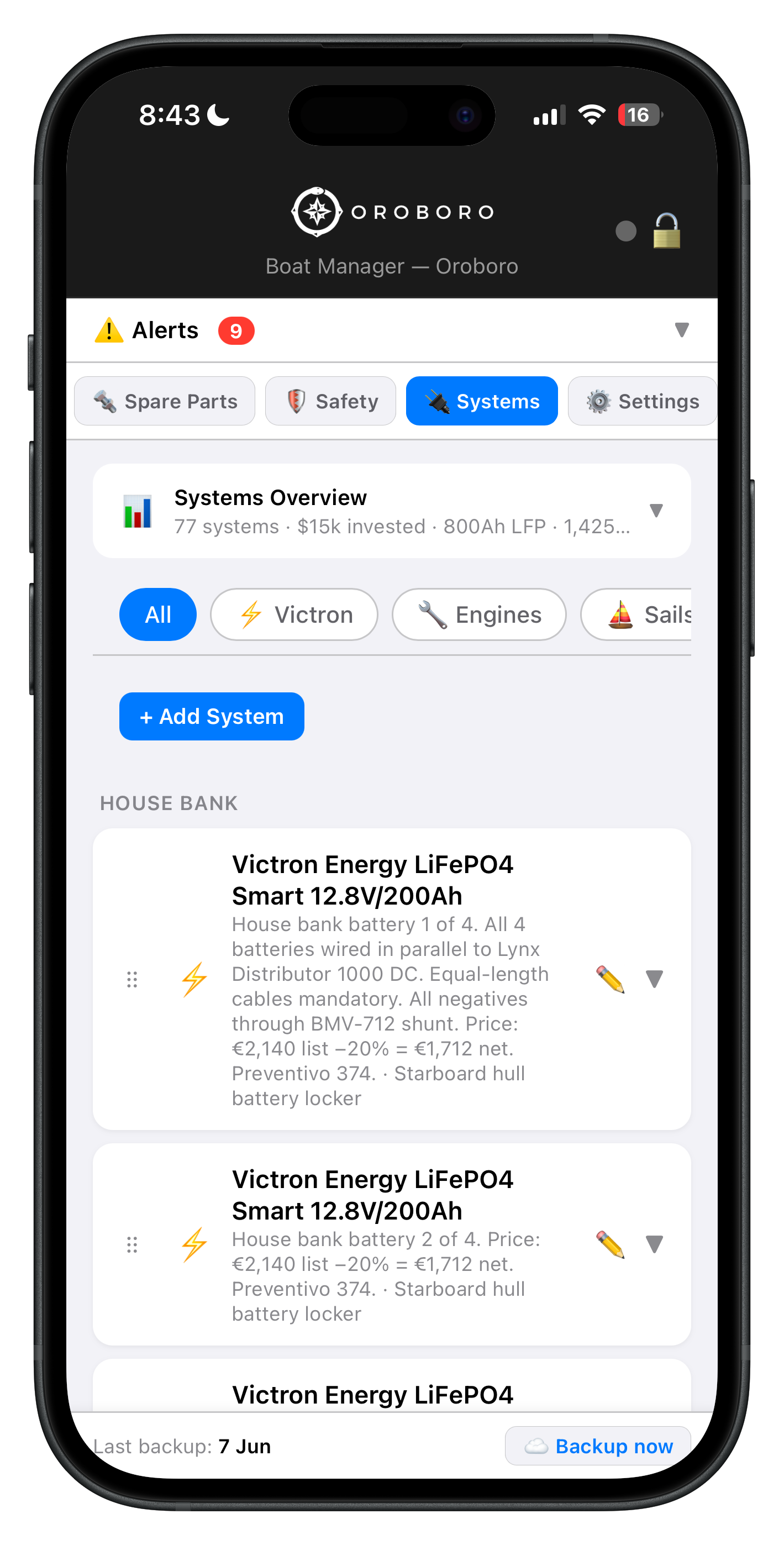
Log every installed system — electrical, mechanical, sails, rigging — with full specs: model numbers, wiring notes, install dates, prices paid, and exact location on board. When a contractor asks what shunt you're running with the LiFePO4 bank, or a surveyor wants the sail inventory, you pull it up in seconds instead of digging through a folder of receipts.

Systems tab showing full inventory of 77 boat systems including Victron LiFePO4 batteries
LPG

How much gas is left. What you paid for it.

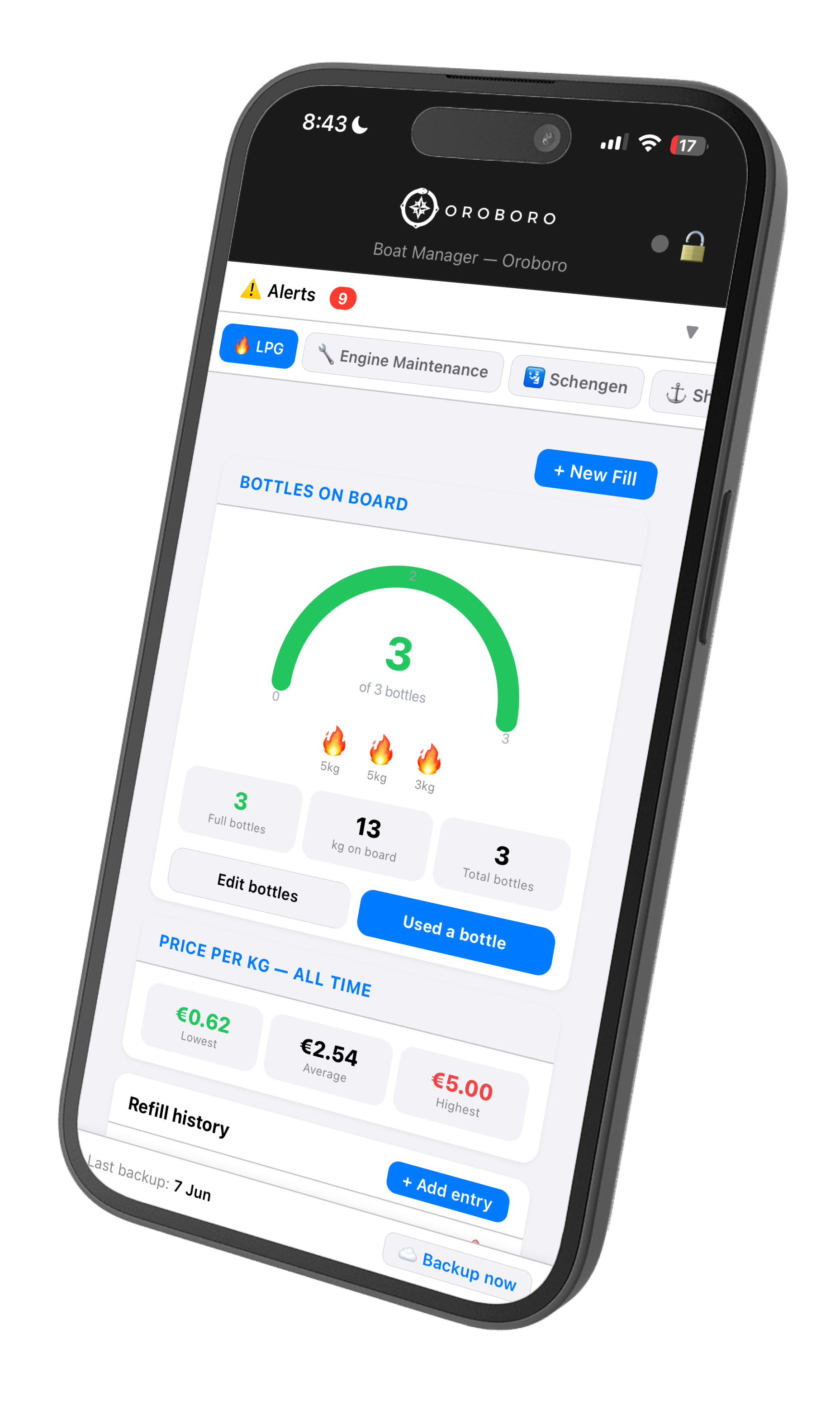
Track every bottle on board by size and log refills as you go. The dashboard shows total kilograms remaining, how many bottles are full, and a running price history — lowest, average, and highest cost per kilogram across every port you've ever filled in. Useful for comparing marina prices between countries, and for knowing if you'll make it to the next port without running dry mid-passage.

LPG tab showing 3 bottles on board, 13kg remaining, and all-time price per kg history
Water Maker

Don't guess when to change the filters.

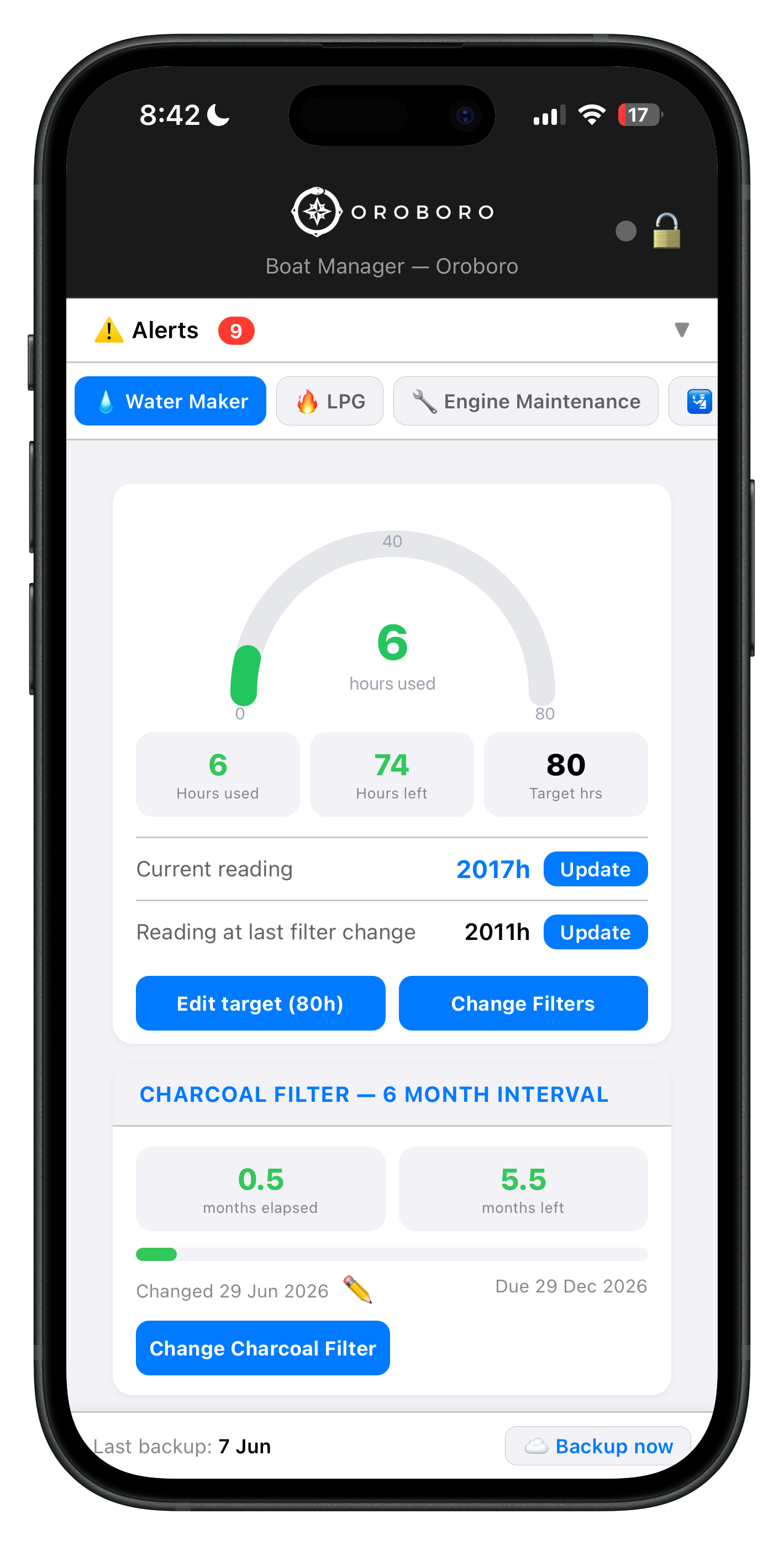
Log your current hourmeter reading and the reading at your last filter change. The gauge calculates hours remaining to the next membrane service automatically — no mental arithmetic, no sticky note on the nav table. A separate charcoal filter tracker runs on a 6-month calendar interval, so you know when it's due even if the watermaker hasn't been used much since the last crossing.

Water Maker tab showing filter hours used, hours remaining to next service, and charcoal filter countdown
Winterize

Every winterization task, in the right order.

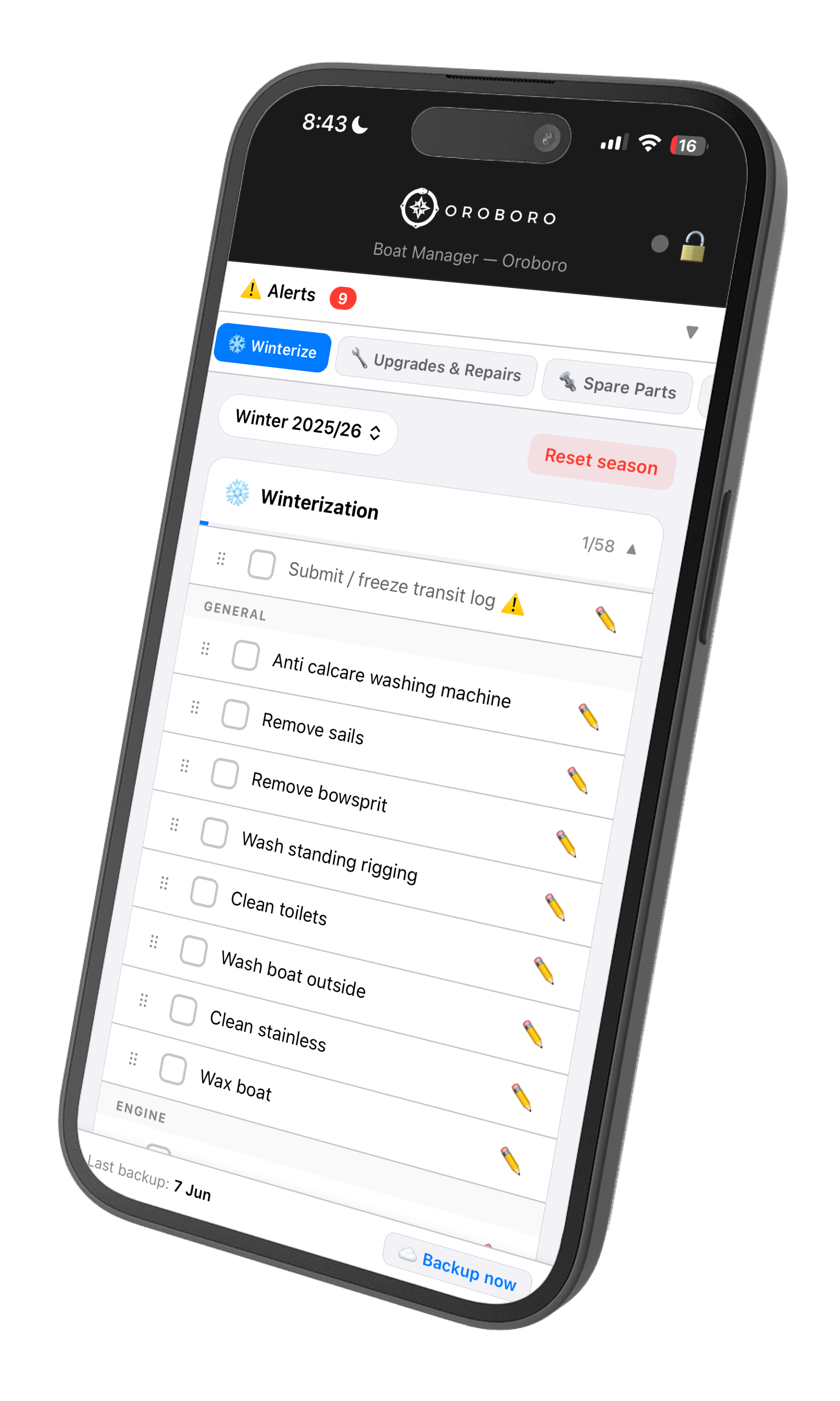
A full seasonal checklist organised into sections — general tasks, engine, rig, systems — with 58 items for Winter 2025/26 and counting. Reset each spring and start fresh for the new season. Add custom tasks specific to your boat. Work through the list anchored in the boatyard or hand it off to your yard manager so nothing gets missed while you're not there.

Winterize tab showing seasonal checklist with 58 tasks across general and engine sections
Settings

Your tabs, your data, your rules.

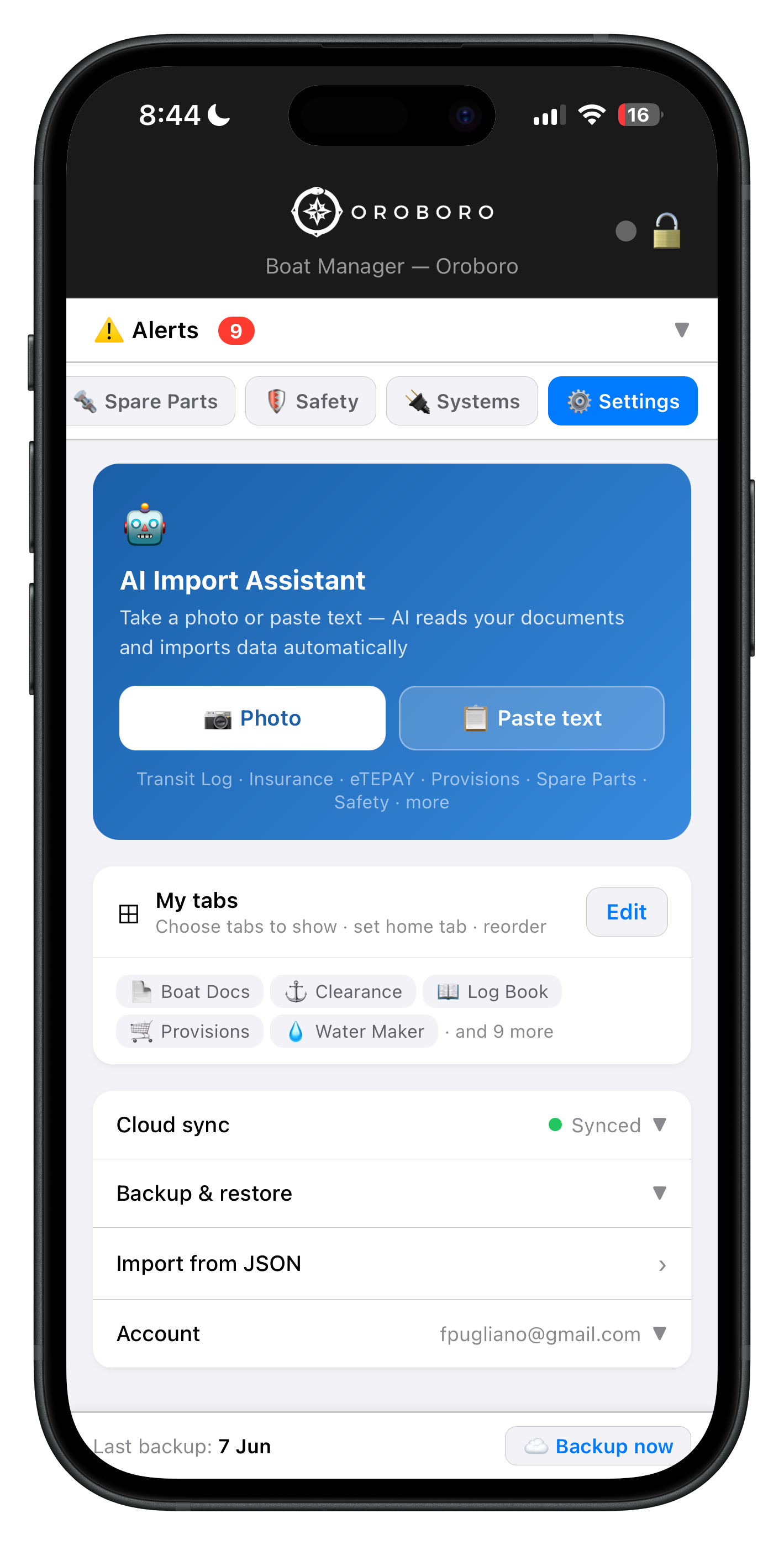
The AI Import Assistant lives here — take a photo of any document or paste text and it maps the data to the right tab automatically. Choose exactly which tabs appear and drag them into the order that makes sense for how you sail. Cloud sync keeps every device current. Backup and restore any time, or import from JSON if you're migrating from a spreadsheet.

Settings tab showing AI Import Assistant, tab configuration, cloud sync, and backup options

Your boat, your tabs.

Sailing the Pacific? Hide the Greek paperwork tabs. Focused on provisioning for a long passage? Put Provisions front and center. Show only what matters to you, in the order you want it.

Clearance Engine Maintenance Provisions Spare Parts Systems LPG Water Maker Winterize Safety Schengen Shipyard Upgrades & Repairs
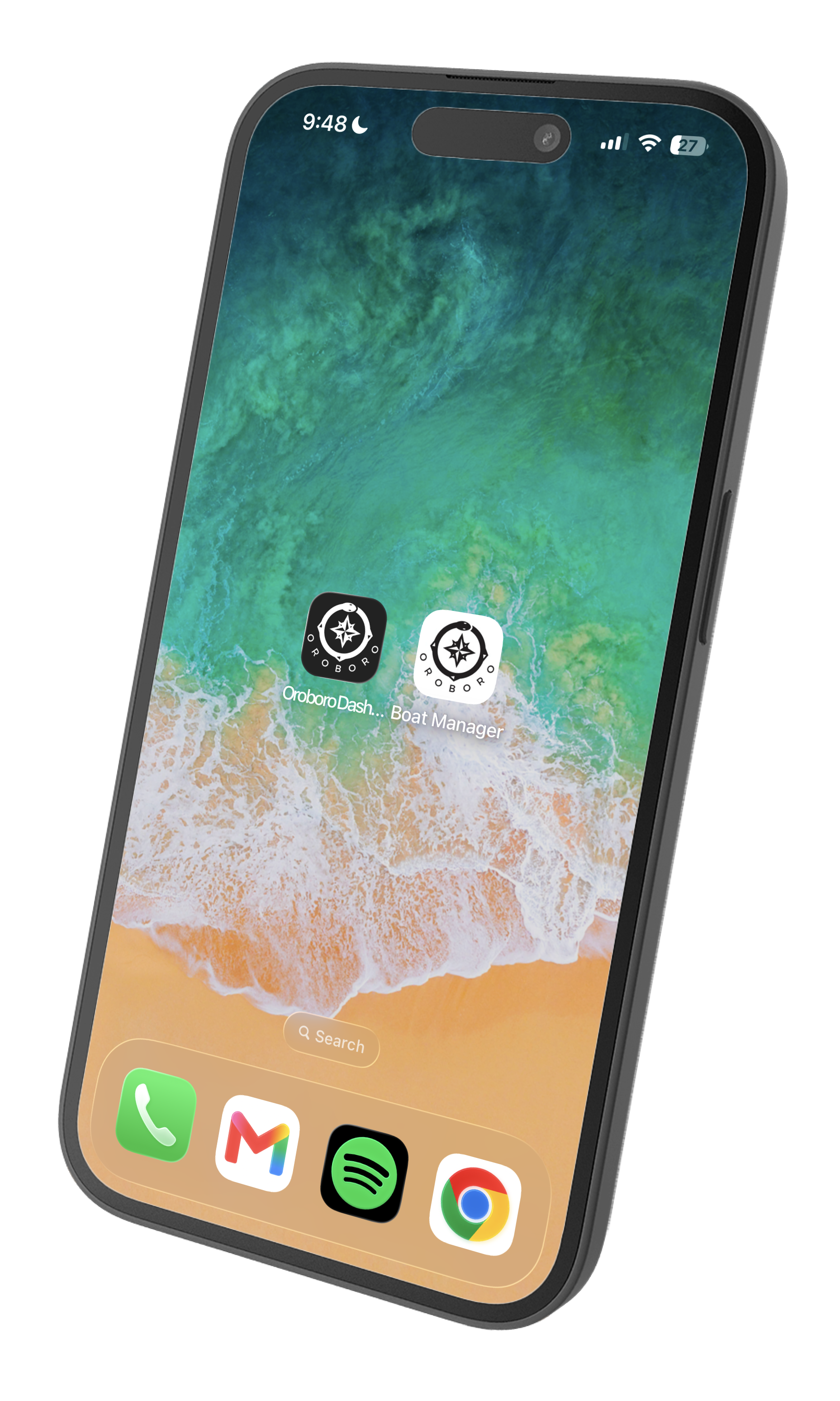
Oroboro Boat Manager icon installed on iPhone home screen alongside other apps

Feels exactly like a native app.

No App Store. No install. Add it to your home screen in three taps — it opens full-screen with its own icon, indistinguishable from any app you've downloaded.

iPhone & iPad — Safari
  1. Open app.sailingoroboro.com in Safari
  2. Tap the Share button — the box with the arrow pointing up, at the bottom of the screen
  3. Scroll down and tap Add to Home Screen
  4. Tap Add in the top-right corner

Must use Safari — Chrome on iPhone does not support home screen install.

Android — Chrome
  1. Open app.sailingoroboro.com in Chrome
  2. Tap the menu in the top-right corner of the browser
  3. Tap Add to Home screen
  4. Tap Add to confirm

Works on Samsung Internet and other Android browsers too — Chrome is most reliable.

Built from 8 years at sea.

"How many hours on a saildrive lip seal? I knew it was in the manual somewhere. And when did I last replace it? Written down somewhere — a notebook, a spreadsheet, a WhatsApp message to myself, or maybe just in my head. Anchored in the Cyclades in a southerly gale, I spent twenty minutes looking across four different places before I found the answer. That's when I decided to build something better."
F
Francesco
Skipper S/V Oroboro · Cape Town to Greece, 2018–present
30,000+
nm sailed
3
ocean crossings
35+
countries
Built
and maintained by the crew

Your boat deserves better records.

Free during beta. No credit card. Works on any device.

Open Oroboro Boat Manager →

Works in any browser · Save to home screen · Shared with your crew · No ads · Encrypted